Although I use a lot of tech, I’m becoming increasingly concerned about how much of my data is stored in the cloud and how it’s used. Sometimes I’m prepared to make a trade-off because an app is especially convenient. AudioPen, for example, is brilliant at capturing thoughts very quickly on my phone before they pop out of my head. But when I’m sat at my desk, I don’t need to use the cloud at all. I was very excited to hear about a new app called Ratschn. This is a local speech-to-text app for Mac and Windows. You configure and press a hotkey, speak, and then Ratschn transcribes the audio recording and pastes it wherever you’re working, whether that’s an email client or a note-taking app.
Everything is done on your computer. You download a speech model which does all the processing locally. This takes up some space on your hard drive, but you gain a lot in terms of privacy and control. There’s a choice of model, depending on how much space you’ve got and how many different languages you require. There’s a lot more information about the Ratschn architecture in the FAQ.
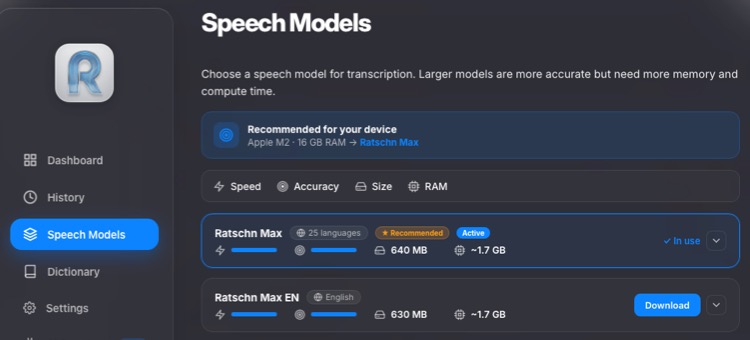
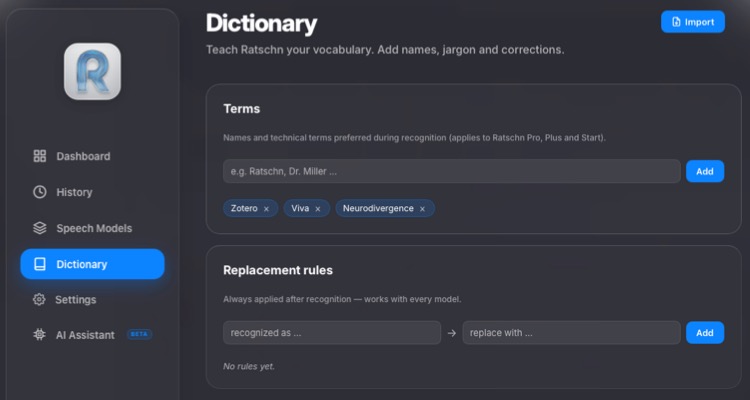
The interface is very simple and intuitive, which belies the sophistication of this tool. It’s highly configurable, including a custom dictionary for unusual words that are unlikely to be transcribed correctly. You can import an existing dictionary in CSV or JSON format. There’s also an automatic replacement feature for any words that are frequently mistranscribed. It’s much more sophisticated than the Mac’s native dictation tool.
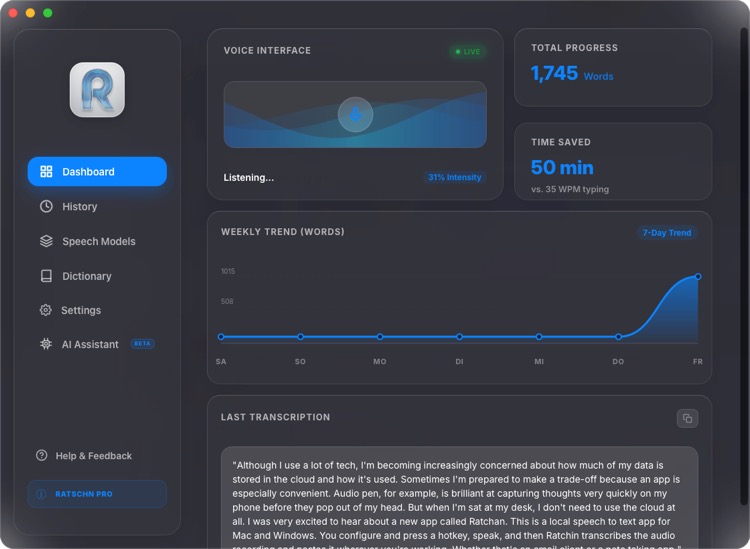
From the Dashboard, you can see your most recent transcription and also marvel at how much time you’ve saved. My typing speed is nearer 90wpm, so I didn’t save 50 minutes. However, my fingers are less tired and my body more relaxed.
As Ratschn runs in the background, you can invoke it from wherever you are. I actually used it for dictating this blog post in Scrivener. Amusingly the only word it didn’t transcribe properly was Ratschn, possibly because my Bavarian pronunciation wasn’t very good. Ratschn is a colloquial word which means to chat.
There’s a new optional AI Assistant that cleans up your writing, similar to the AudioPen feature. It corrects grammar, spelling, and other slips. You can choose a writing style of Natural, Professional, Friendly, Concise and direct, or even set your own custom preference. For this to work, you need to enable Apple Intelligence in your Mac settings. I deliberately disabled this feature. I want to make sure that all my writing comes from my own head and that my thoughts haven’t been changed. I’d probably use it for making cleaner notes that aren’t destined for publication, though.
Ratschn is now a core part of my workflow. I use AudioPen on my phone for making notes while reading, MacWhisper for transcribing videos and audio, and Ratschn for anything that needs to remain private and local. A big thank you to the developer for creating an excellent privacy-focused tool.
💰Ratschn costs €3 euros a month, or €19 euros annually. Currently, you can get a lifetime subscription for a one-off payment of €25. There’s also a free 1-week trial if you want to give it a go before committing yourself.
😇 Disclosure: The developer gave me free lifetime access, but I would recommend Ratschn anyway. I decline most requests to review apps, as I’ll only write about those that are genuinely useful.