When I did my PhD, I had notes in about 15 different places. I mostly got away with it, because I was younger and had the energy to charge around the house in pursuit of a specific source. Nowadays, I have to adopt a more dignified approach. Fortunately, Readwise is here to help me.
Readwise makes it easy to capture, organise, and revisit highlights from whatever you’re reading, whether that’s ebooks, articles, or physical books. You can also add comments while you highlight, so you’re less likely to forget those important insights.
Capturing highlights
Readwise integrates directly with ereaders, including Kindles, Kobos, and Apple Books. Anything you highlight is automatically saved to your Readwise Library, along with comments or notes you’ve made.
If, like me, you prefer physical books, you can use the Readwise app to capture highlights by taking a photo. This works with both iPhones and Androids. Readwise quickly transcribes the text from the image, then prompts you to add the page number and any notes. I find the accuracy very high, even on older books and with different languages. You do need a steady hand and good lighting, though.
Although Readwise works with Pocket and Instapaper for highlighting PDFs and webpages, there’s also the built-in Reader feature that provides the same functions. You can use this feature to subscribe to and read newsletters, too. This prevents them from cluttering up your email inbox and also means you can capture your highlights from these sources.
Organising highlights
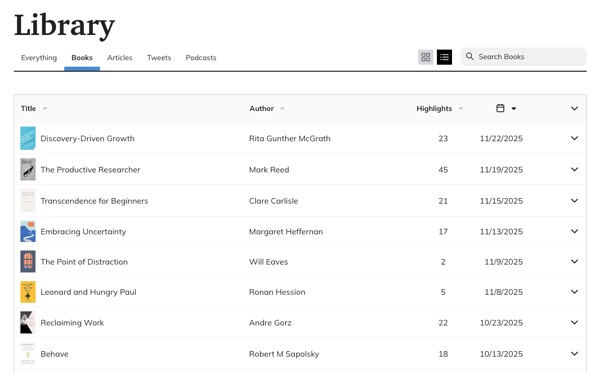
Everything you capture is saved to your Readwise Library. As you’re highlighting, you can add tags to group your sources. This helps you make connections between books, articles, and webpages.
You can browse or search your Library and also sort the titles to see which sources you’ve highlighted most.
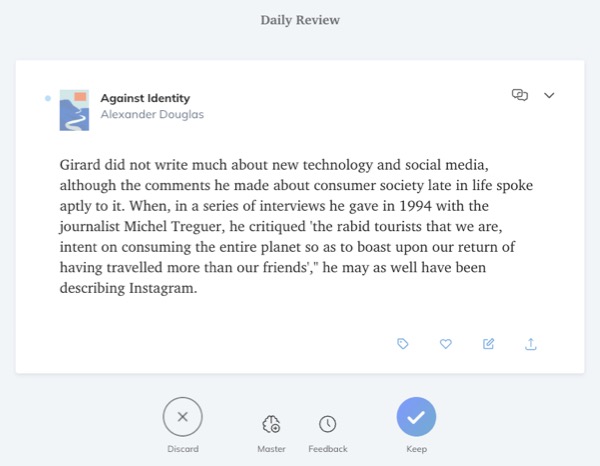
If you’re a voracious reader, you can end up with a lot of highlights. I use the Daily Review feature to discard anything that’s no longer useful. It’s also excellent for nudging your brain about sources you’ve forgotten. Each day, Readwise shows you 5 highlights. This gives you an opportunity to delete them, add a tag, or edit the text.
Inevitably, there are built-in AI features for interacting with your highlights. I avoid them, though, as it’s easy to miss something important with AI summaries. Also, I want to be clear on what’s my original idea versus what the AI has generated. As I’ll explain in a separate post, I occasionally use NotebookLM to query my notes.
Exporting highlights
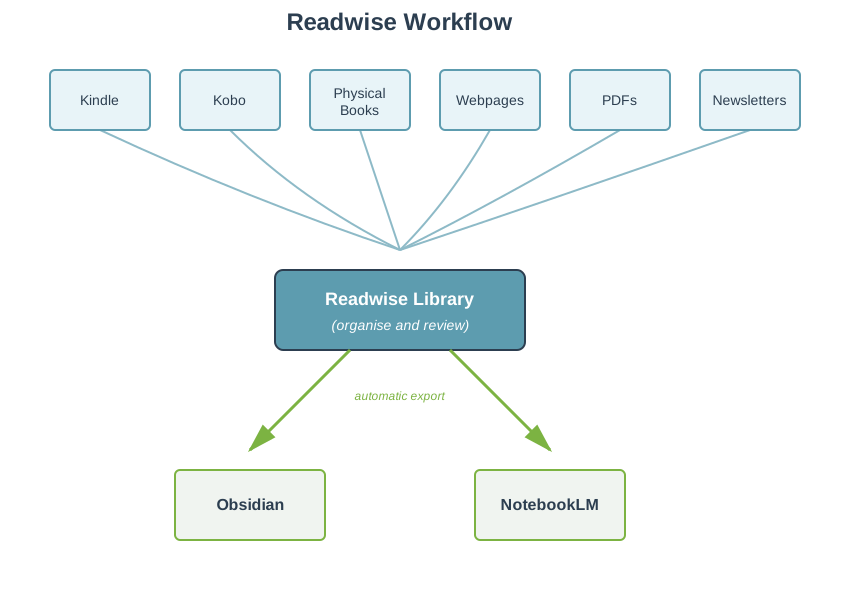
Although the Readwise Library is powerful, I like to keep all my notes in one place. For me, that’s Obsidian, a markdown-based app. That’s where I do a lot of my thinking and also work on early drafts. Readwise automatically syncs my highlights to Obsidian. By the time I’ve put down my book, all those notes have been delivered to my desktop. My voice notes from AudioPen are also synced to Obsidian. Readwise can automatically export to most other notetaking apps, including Notion, Evernote, and Roam. It’ll also export to NotebookLM, allowing you to interact with your notes.
Conclusion
Readwise has significantly streamlined my reading and notetaking process. I currently use it to capture highlights from my elderly Kindle, my Kobo (for library ebooks), physical books, webpages, PDFs, and newsletters. Everything is funnelled into the Readwise Library, then automatically exported to Obsidian and NotebookLM.
There are two subscription tiers for Readwise. The Lite version ($5.59 per month) allows you to save and browse your highlights and includes the Daily Review. If you want to organise your highlights with tags, export them to other apps, and use the Reader app (for PDFs, webpages, and newsletters), it’ll cost you $9.99 per month. Pleasingly, that price is fixed, so you’ll never pay more for it. This is a rare and welcome example of a company rewarding loyalty.1
I always feel happy when my Readwise subscription is due for renewal, as it reminds me how helpful it has been over the year. I no longer have to try and remember where I made a note - everything’s in one place.
📺 You can also see my video overview of Readwise from 2021.
👉 We discuss Readwise and similar tools in my workshop Accelerate Your Research with AI.
I’m not affiliated in any way with Readwise, just an enthusiastic user. ↩︎