Google’s NotebookLM is an AI-powered research assistant that helps you analyse your own content in almost any format, including Google Docs, PDFs, videos, and audio files. You create virtual notebooks for each topic or research area, then upload relevant documents. NotebookLM creates a custom dataset (or searchable knowledge base) from those files that you can then query. Unlike other chatbots, the responses are based on the content that you provided. And those responses include citations to the original passages - you know exactly where that answer has come from. The other big advantage of NotebookLM is that it can handle up to fifty 500,000-word documents. That’s a total of 25m words! Even if you’re a prolific note-taker like me, you’d struggle to exceed its capacity.
How I use NotebookLM
I only use NotebookLM occasionally. Mainly, it’s when I’ve got a vague idea of something I read a while ago and need to track it down. Although I keep all my books notes and reflections in Obsidian, the search feature only retrieves the correct content if I’ve remembered the exact wording. With NotebookLM, I can ask questions such as:
“What’s the quote from George Bernard Shaw about the location of railway stations?”
I couldn’t find this quote in Obsidian because the quote was actually from Bertrand Russell. I’d got my beardy men in a tangle. NotebookLM found the correct quote in a couple of seconds. Whereas Obsidian uses keyword matching, NotebookLM performs a semantic search - i.e. it understands the intent of a query.
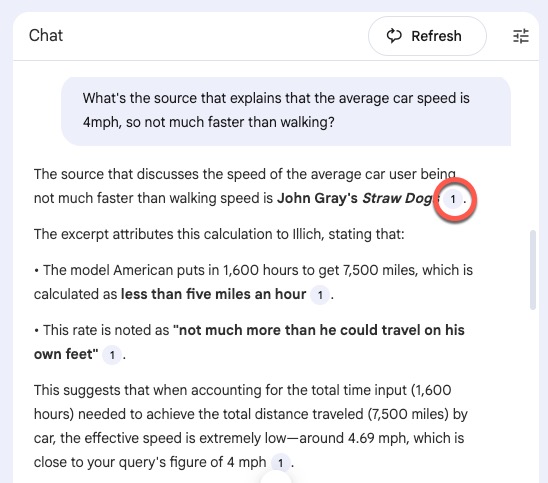
“What’s the source that explains that the average car speed is 4mph, so not much faster than walking?”
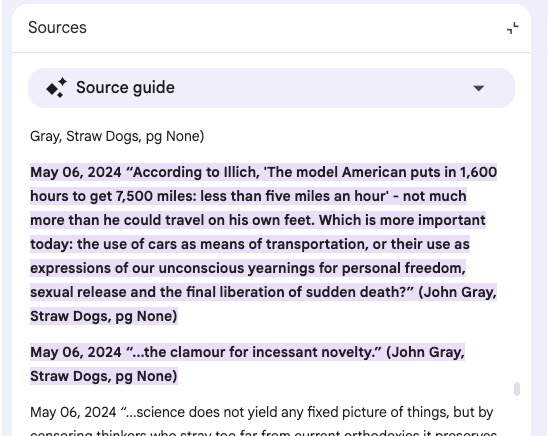
NotebookLM found this in Straw Dogs by John Gray. In fact, the speed was “less than five miles an hour” and the phrase “not much more than he could travel on his own feet,” so I probably wouldn’t have found it through a standard search.
As you can see in this screenshot, I get a linked citation to the original source so can easily check and copy the quote.
And here’s the source:
I also use NotebookLM to find gaps in the literature. Here’s a example prompt for a notebook containing journal articles:
What are some of the gaps in these sources? What research questions have been overlooked or insufficiently addressed?
NotebookLM analyses themes, arguments, and topics across all your sources to identify areas that have been overlooked or received limited attention. It can also spot conflicting perspectives that haven’t yet been reconciled.
This usage is riskier, as a gap in these specific sources doesn’t mean the gap hasn’t been addressed elsewhere. However, if I’m confident that I’ve read the most important literature on this topic, then any gaps are worth following up. At the very least, I have a clearer sense of where those gaps might lie - it’s narrowing the territory for me.
I’ve linked NotebookLM with Readwise, the tool I use for capturing and organising highlights from ebooks, physical books, PDFs, and webpages. Everything is automatically exported to documents in Google Drive, which NotebookLM accesses directly.
What else can you do with NotebookLM?
I’m only using a tiny fraction of NotebookLM’s features. You can also use your content to create videos, audio overviews, flashcards, quizzes, and mindmaps. Personally, I don’t think the quality of these outputs justifies the carbon footprint. I experimented with a video to see what would happen. Although the content of the voiceover wasn’t too bad, the visual elements relied on terrible clipart and heavy-handed imagery.
NotebookLM can also create detailed text-based reports on topics of your choice. I keep away from this feature, though, as it’s too easy to let AI do your writing for you. I always want to be clear on what I’ve written. Although NotebookLM is using your content to generate the responses, it’s also relying on the underlying language model for its insights and understanding of the world. For academic research, it needs to be your insight and understanding.
What are some of the limitations of NotebookLM?
As with any AI tool, you need to use it intentionally. Although Google states that they won’t use your data to train their models, you should still proceed with caution. This is especially important if you’re working with sensitive data. I use NotebookLM only with reading highlights, all of which is content that Google has access to, anyway. I wouldn’t use it for analysing my own thoughts or other people’s data.
Conclusion
Yes, I have some reservations about NotebookLM, but it’s brilliant for finding those forgotten quotes or hidden gaps. I like it because:
- There’s no mystery about what’s in the database - in my case, it’s all books or journal articles I’ve chosen and read.
- It saves me a lot of time, given I have a significant body of notes (~1m words).
- It’s much faster and more effective than most search engines.
Currently, NotebookLM is free for anyone with a personal Google account.
If you use NotebookLM intentionally, it can be a valuable part of your research workflow.
👉 We discuss NotebookLM and similar tools in my workshop Accelerate Your Research with AI.